Free Keyword Tool
Powered by Semrush Keyword Magic Tool
Find the right keywords for SEO, content planning, and AI search visibility. Use real search demand to decide what topics and pages to prioritize next.
For example: seo strategy, keyword research
- Keyword suggestions related to your topic or business
- Monthly search volume for each keyword
- Keyword difficulty scores to find winnable opportunities
- Search intent to understand what the user wants
- CPC data to identify higher-value keywords
- Long-tail keywords and content opportunities
Need a premium keyword research tool? Try Keyword Magic Tool
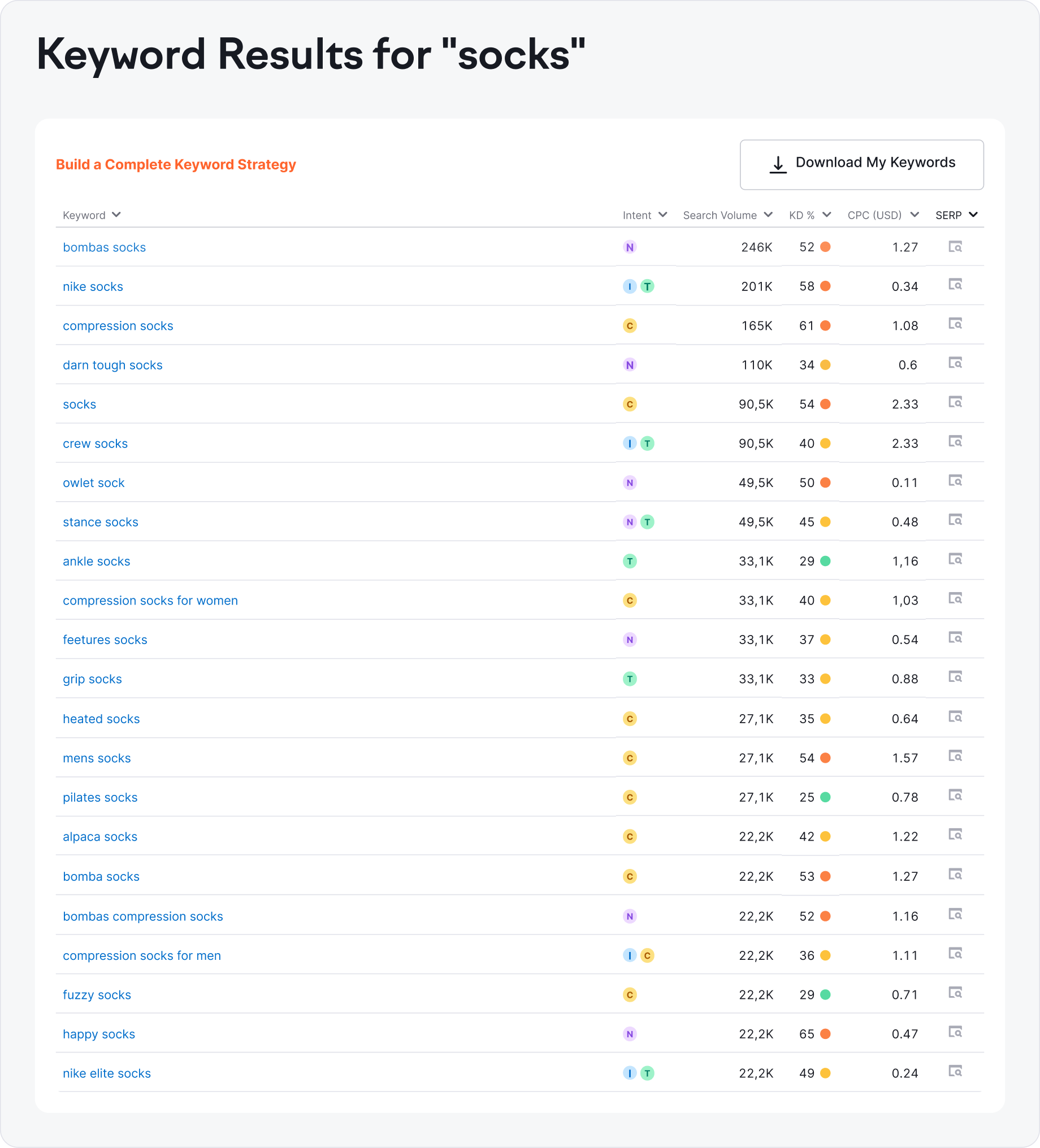
Keyword results for: socks
Showing the first 15 of 10,000+ keywords
| Keyword | Intent | Search Volume | KD % | CPC (USD) | SERP |
|---|---|---|---|---|---|
| bombas socks | NC | 246K | 70 | $0.83 | |
| compression socks | I | 165K | 56 | $1.16 | |
| nike socks | T | 165K | 49 | $0.46 | |
| darn tough socks | N | 135K | 44 | $0.62 | |
| socks | IC | 90.5K | 71 | $2.20 | |
| owlet sock | I | 60.5K | 52 | $0.22 | |
| compression socks for women | I | 40.5K | 37 | $1.08 | |
| merino wool socks | IC | 40.5K | 30 | $1.21 | |
| stance socks | N | 40.5K | 33 | $0.52 | |
| supreme socks | T | 40.5K | 21 | $0.66 | |
| crew socks | IC | 33.1K | 28 | $1.36 | |
| feetures socks | NC | 33.1K | 46 | $0.72 | |
| grip socks | I | 27.1K | 38 | $0.95 | |
| heated socks | IC | 27.1K | 32 | $0.88 | |
| ankle socks | I | 22.2K | 25 | $0.54 |
Keyword results for: null
Unfortunately, we couldn't find any related suggestions for this keyword.
Need help finding the right keywords?
Get personalized keyword suggestions your site can win.
 Start Your Free Trial
How to Use the Keyword Tool
-
Enter a keyword or topic related to your business
-
Click "Find Keywords" to generate related keyword suggestions
-
Review the data to find the best keywords to target
What Is Keyword Research?
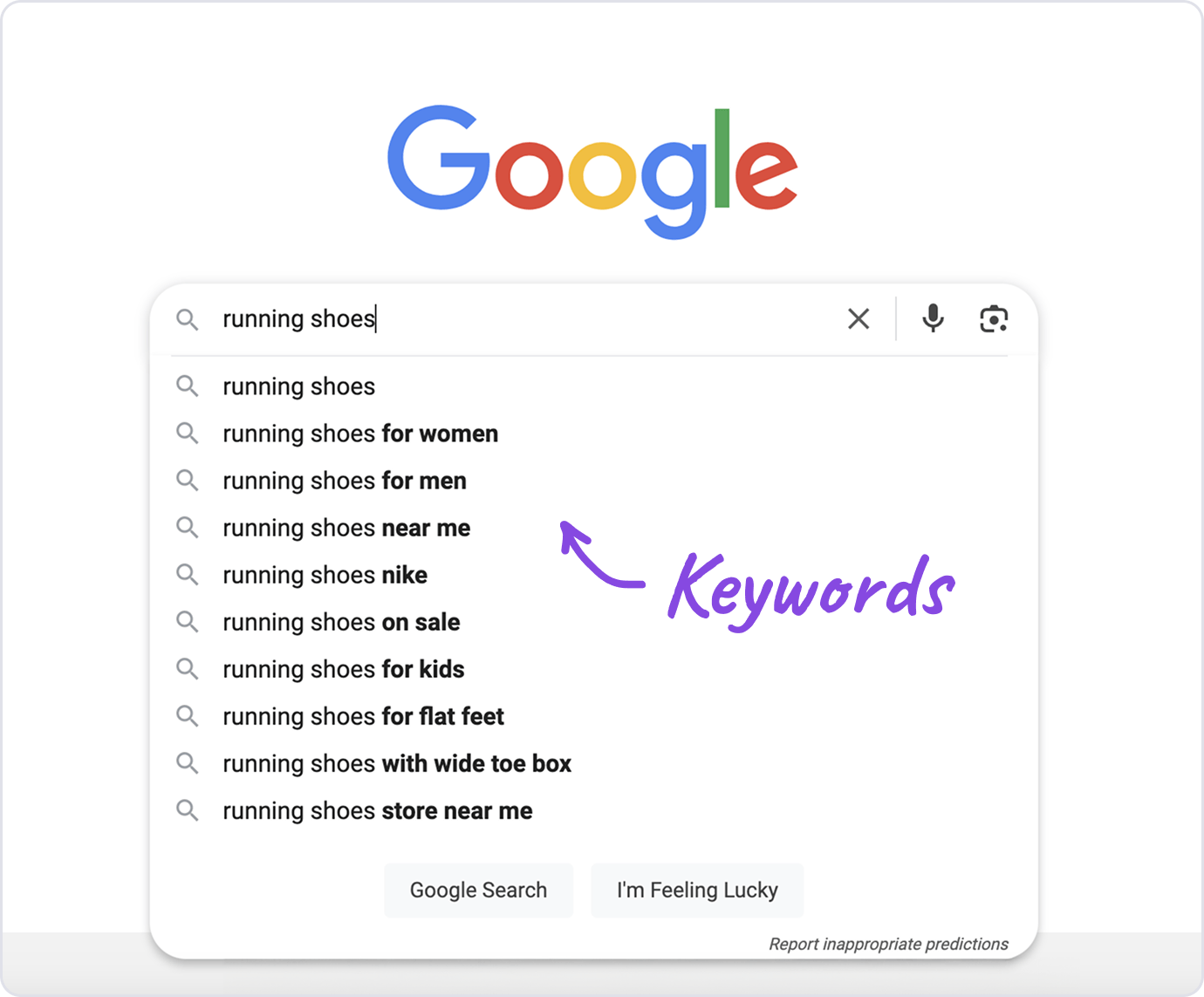
Keyword research is the process of finding the exact words and phrases people type into Google and AI search platforms when they search for something related to your website or business.
It tells you what your audience is searching for, how many people search for it each month, and how hard it is to rank for those terms.
Without keyword research, you’re guessing what to write about and hoping it matches what people actually search for.
Keyword research tells you exactly which topics to target, which pages to create, and which keywords give you the best chance of appearing in search results and driving traffic to your site.
Keyword research also applies to paid advertising. The keywords you target in Google Ads determine who sees your ads, how much you pay per click, and whether your budget drives real results or gets wasted on irrelevant searches.
What Is a Keyword Tool?
A keyword tool is an online tool that uses real, accurate search data to show you the exact words and phrases real people are searching on Google and other search platforms.
Type a word or phrase into the tool and it will show you related keyword suggestions, including ideas you might not think of on your own.
Our keyword tool also displays important data for each keyword including monthly search volume, keyword difficulty, and cost-per-click (CPC). These metrics show you how often people search for a keyword, how hard it is to rank for, and what advertisers pay per click.
By combining keyword suggestions with reliable data, Semrush Keyword Tool helps you find the right keywords for your website, making it easier for Google and AI search platforms to connect searchers with your site.
What Can Our Keyword Research Tool Do?
Here’s what our keyword research tool can do:
-
Identify high-value keyword opportunities
Find keywords with high search volume and low competition so you have a realistic chance of ranking in Google and appearing in AI search results.
-
Discover long-tail keywords
Find specific phrases and questions that attract highly interested visitors. These are also the types of queries that AI search platforms like ChatGPT and Google AI Overviews frequently answer.
-
Generate related keyword ideas
Discover keyword suggestions and variations you might never think of, increasing your website’s reach across both traditional and AI-powered search.
-
Uncover search intent
See whether a keyword signals research, comparison, or buying, so your content matches what users expect to find in search results and AI answers.
-
Compare SEO keyword metrics
Check search volume, keyword difficulty, and CPC side by side to decide which keywords to target.
-
Build cost-effective PPC campaigns
Add proven keywords to ad groups and cut wasted spend on poor performers.
-
Turn keywords into content plans
Group related keywords into blog posts, landing pages, and FAQs that match what people search for at each stage, from initial research to buying.

How to Do Keyword Research
Here’s how to do keyword research from start to finish:
- 1. Start with seed keywords: Think about the main topics your website covers and the words your customers would use to describe them. These are your seed keywords, broad terms like "email marketing" or "running shoes" that serve as starting points.
- 2. Expand your list with a keyword tool: Enter each seed keyword into a keyword research tool to generate related suggestions. Look for variations, long-tail phrases, and questions you wouldn’t have thought of on your own.
- 3. Analyze the metrics: For each keyword, check the search volume (how many people search for it), keyword difficulty (how hard it is to rank), and CPC (how much advertisers pay per click). These numbers tell you whether a keyword is worth targeting.
- 4. Check search intent: Look at what Google actually shows for each keyword. If the top results are blog posts, the keyword calls for informational content. If they’re product pages, it’s commercial or transactional. Your content needs to match what searchers expect to find.
- 5. Filter and prioritize: Narrow your list to keywords that are relevant to your site, have enough search volume to matter, and are realistic to rank for given your site’s authority. Group keywords by search intent (informational, commercial, transactional) so you can match each group to the right type of content. The best opportunities are usually keywords with decent volume and low to moderate difficulty.
- 6. Map keywords to pages: Assign each keyword or keyword group to a specific page so your own pages don’t compete against each other in search results. Each page should target a unique set of keywords that share the same meaning or intent.
Follow these steps and you’ll have a prioritized list of keywords that tells you exactly what content to create and which pages to optimize.
How to Read Keyword Metrics
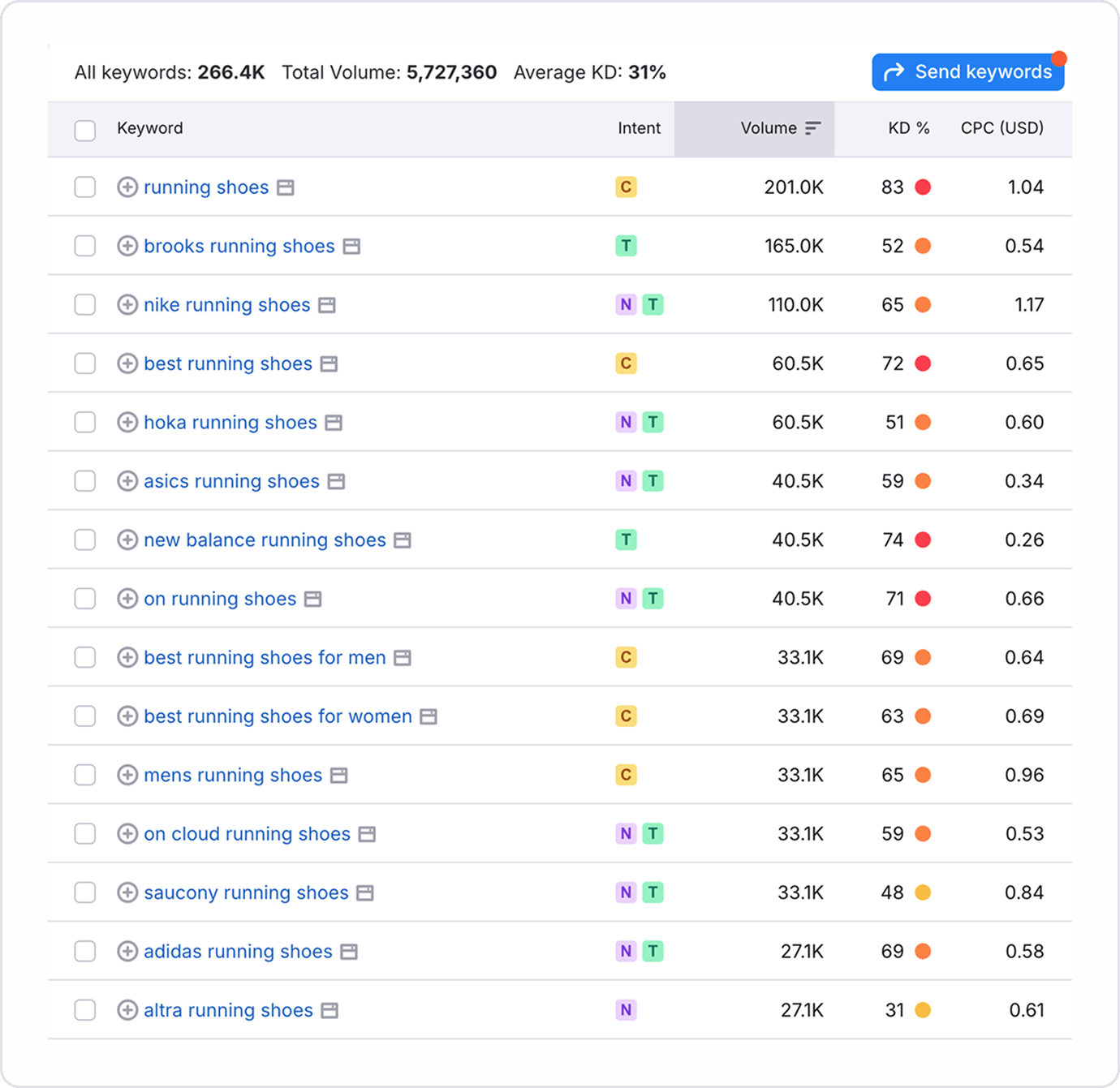
Here’s how to read the keyword metrics in your report:
- Search Intent: The label next to each keyword tells you what kind of content searchers expect to find. If the intent doesn’t match the type of page you can create, skip that keyword.
- Search Volume: How many times per month people search for that term. For newer or smaller sites, keywords in the 100 to 1,000 range are a practical starting point. A keyword with zero or near-zero volume is rarely worth a dedicated page.
- Keyword Difficulty: A score from 0 to 100 estimating how hard it is to rank on the first page. Newer sites should focus on scores under 30. Anything above 80 is usually dominated by major brands with thousands of backlinks.
- CPC (Cost Per Click): What advertisers pay per click in Google Ads. A high CPC (roughly $3 or more) signals that the keyword drives revenue, so ranking organically for it is especially valuable.
Look at these metrics together, not in isolation. A keyword only makes sense to target when the volume, difficulty, and intent all line up with what your site can realistically deliver.
How to Choose the Best Keywords for Your Website
Here’s how to choose the best keywords for your website from a list of keyword ideas:
- 1. Check relevance first: A keyword is only useful if your site can genuinely satisfy the searcher. For example, "running shoes" fits a shoe store, but "running shoe repair" doesn’t if you only sell new products. High volume on an irrelevant keyword won’t send you useful traffic.
- 2. Weigh volume against difficulty: When a keyword has high search volume but also high difficulty, a newer site is unlikely to rank for it. Favor keywords you can realistically compete for, even if they get fewer searches. A page that ranks on page one for a smaller keyword will outperform a page stuck on page five for a popular one.
- 3. Watch for misleading keywords: Some keywords look promising in the data but won’t work in practice. Branded terms (like "Nike running shoes") send searchers to that brand’s site. Broad terms (like "shoes") often return results that don’t match what you offer. Before targeting a keyword, search it yourself and look at what actually ranks. If your content wouldn’t fit alongside those results, move on.
Apply these checks to every keyword on your list and you’ll end up with a focused set of terms your site can realistically rank for and benefit from.
How to Find Long-Tail Keywords
Long-tail keywords are longer, more specific search phrases like "best email marketing tool for small business" instead of just "email marketing." They typically have lower search volume, but they’re easier to rank for and attract visitors who are closer to taking action.
To find long-tail keywords, enter a broad seed keyword into the keyword tool and look for suggestions that are three or more words long. Focus on phrases with lower keyword difficulty scores and clear search intent. These are the terms where newer or smaller sites can compete.
You can also look for question-based keywords, which often start with "how to," "what is," or "why does." These are natural long-tail phrases that tell you exactly what the searcher wants to know, making it easier to write content that directly answers their query.
Long-tail keywords are especially valuable for blog posts, FAQ pages, and niche landing pages where matching specific intent matters more than chasing high volume. They also tend to be the types of queries that AI search platforms like ChatGPT and Perplexity reference in their answers, giving your content visibility beyond traditional search results.
What Can You Do With a Keyword Research Tool?
Here are 5 practical tasks you can do with a keyword research tool:
-
Plan your content calendar
Sort your keyword results by volume and difficulty to decide which topics to publish first. Group related keywords together so each page targets a primary term and two to three supporting terms.
-
Improve your local SEO
Search for location-based phrases like "seo agency in manchester" or "restaurants near me." Target keywords that include your city, region, or "near me" terms to attract customers searching for local businesses.
-
Refine your advertising campaigns
Filter your keyword list for commercial and transactional intent terms, then check CPC data to find keywords that deliver more clicks for your budget. Build ad groups around terms with strong commercial intent and manageable CPCs instead of guessing which phrases to bid on.
-
Expand into international SEO
Use the location selector to pull keyword data for other countries. Compare search volumes across regions to find where demand is strongest, then plan localized content for those audiences.
-
Strengthen your AI search visibility
Filter your results for question-based keywords and "what is" or "how to" phrases. These are the types of queries where AI tools like ChatGPT and Google AI Overviews pull from web sources. Create clear, direct answers to those questions so your site is more likely to earn visibility in AI search.
Why You Should Use Our Free Keyword Tool
You should use our free keyword tool because it’s built on the largest keyword database in the industry and uses powerful AI insights to provide deeper and more accurate data than any free alternative, including Google Keyword Planner.
Powered by our Keyword Magic Tool with more than 26 billion keywords and growing, our free keyword research tool provides highly relevant ideas and suggestions in seconds. Each keyword includes the data you need to decide whether it’s worth targeting for SEO or paid ads.
The tool also provides valuable long-tail keyword opportunities and serves as a free Keyword Planner alternative with no hidden ranges or account requirements.
One search gives you the data you need to choose the right keywords for your site.

What’s the Difference Between the Free Tool and Keyword Magic Tool?
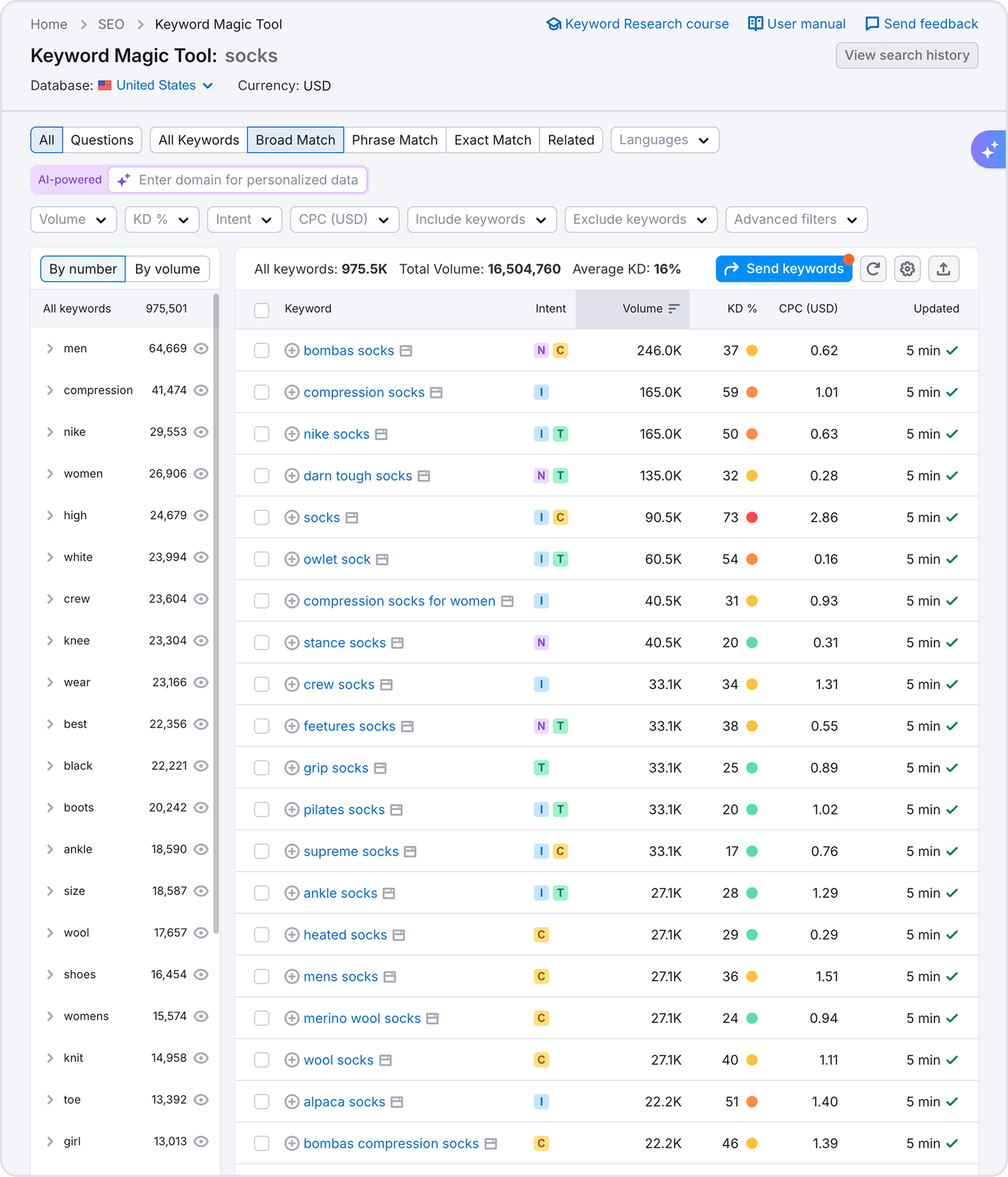
The free Keyword Tool gives you a limited number of broad match keyword suggestions with core metrics like search volume, keyword difficulty, CPC, and intent. It’s designed for quick research. Enter a keyword, get ideas, and make decisions without creating an account.
Keyword Magic Tool is the full version. It removes all limits and adds the features that SEO professionals need for deeper research:
- Unlimited keyword results: See the full list of related keywords, not just the top suggestions
- Advanced filters: Narrow results by exact match, phrase match, word count, SERP features, and more
- Topic grouping: Keywords are automatically organized into topical clusters so you can plan content around related themes
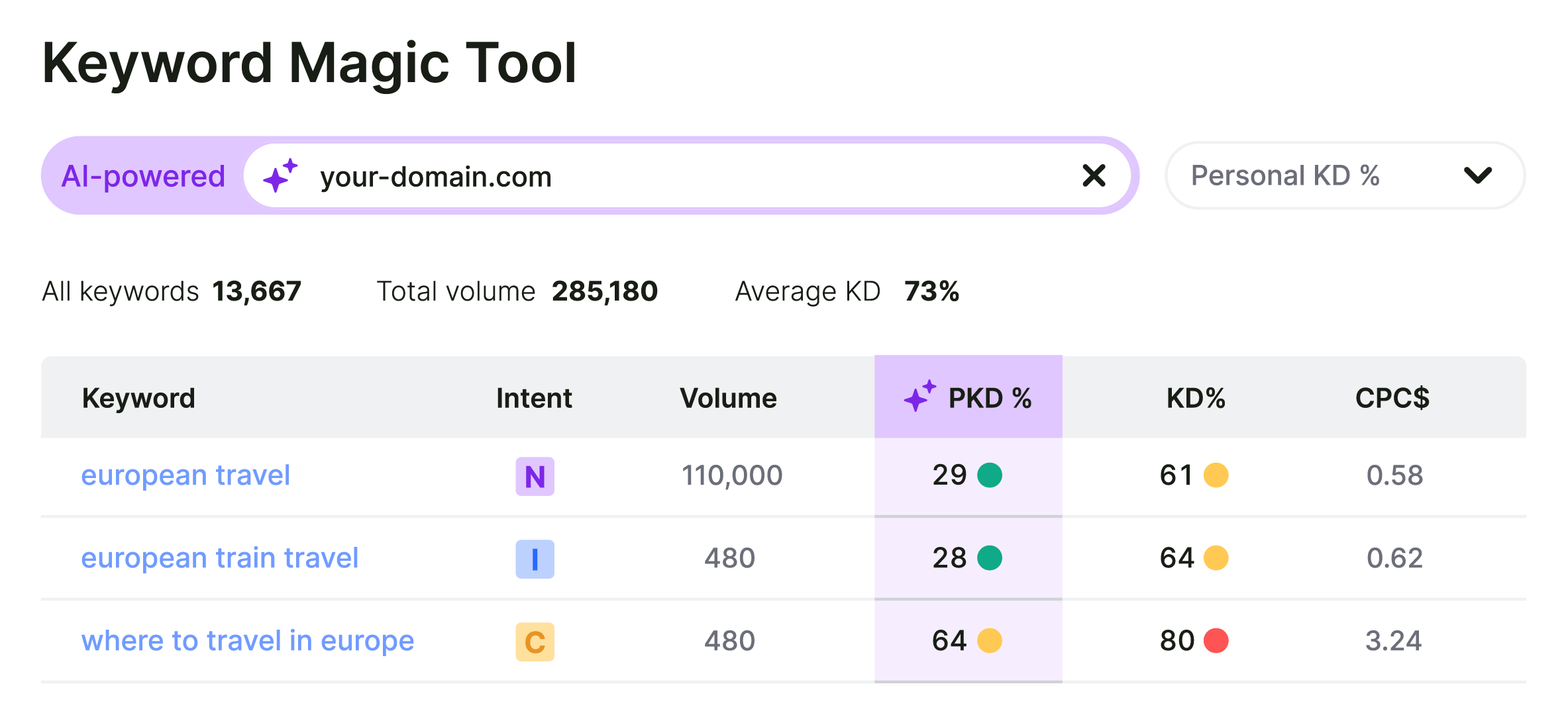
- Personal Keyword Difficulty: Get difficulty scores adjusted to your specific domain’s authority, not just a generic number
- Export and list management: Save keyword lists, organize them into campaigns, and export for reporting
If you need quick keyword ideas, the free tool is enough. If you’re building a full SEO or content strategy, Keyword Magic Tool gives you the depth and control to do it right.
Frequently Asked Questions
Is the Keyword Tool Free to Use?
Yes, the Keyword Tool is free to use. You can use the tool up to five times per day for free, without registering or creating an account.
For more flexibility, deeper keyword data, and advanced sorting and filtering capabilities, you can register for a free Semrush account or upgrade to a paid plan for full access to advanced features and competitive insights.
How Does Semrush’s Free Keyword Research Tool Work?
Semrush’s free keyword research tool works by pulling broad match keywords from Semrush’s massive database of real Google search terms. Broad match means the tool returns any keyword that contains your seed term along with variations, related phrases, and longer queries that include it. For example, a search for "seo" will also surface terms like "seo tools for small business" or "how to learn seo."
Each keyword includes metrics such as monthly search volume, keyword difficulty, cost-per-click (CPC), and intent. The data is updated monthly, helping you find the most relevant and current keywords for your topic.
How Accurate Is the Keyword Data?
The keyword data is highly reliable and based on real Google searches from Semrush’s database of more than 26 billion keywords.
Because Google doesn’t release exact search volumes, no tool can provide perfectly precise numbers, but Semrush’s data is updated monthly and offers dependable, directionally accurate insights to guide your keyword and content decisions.
What Is the Best Free Keyword Research Tool?
The best free keyword research tool is Semrush Keyword Tool. It pulls from a database of 26+ billion keywords, gives you real search volume numbers instead of broad ranges, and includes keyword difficulty scores. You don’t need to create an account or enter payment details to use it.
Google Keyword Planner is another popular option, but it requires a Google Ads account and only shows rounded volume ranges. Semrush’s free tool uses the same data that powers its paid tools, updated monthly, so you’re working with accurate, current numbers from the start.
How Many Keywords Should I Target per Page?
You should target one primary keyword and a small cluster of closely related terms (usually three to five secondary keywords) that share the same intent.
If two keywords have essentially the same meaning and Google shows similar results for both, they belong on the same page. If the search results are different, they should be targeted with separate pages. Trying to target too many unrelated keywords on a single page dilutes your relevance and makes it harder to rank for any of them.